Different organization have their own software products and engineering practices to support the development. Having a good repository management is key to having a great engineering process. However, in my experience in consulting organizations in digitalizing and adopting robust engineering practices, I have seen teams struggling to find the right repository management practice for their project or product structure. In this article I will try to provide recommended git practices for four common types of agile projects: internal projects with multiple teams, external client projects, multi-client products with different versions, and SaaS products with a single codebase used by multiple clients.
- Internal Project with Multiple Development Teams
- Project Characteristics:
- Client: Single internal client.
- Teams: Multiple development teams.
- Release Strategy: Planned production releases, QA releases every sprint.
- Recommended Git Practices:
- Branching Strategy:
- Main Branch: Use
'main' or‘master‘ as the stable branch where the latest production-ready code resides. - Development Branch: Create a ‘
develop‘ branch where all new features, improvements, and bug fixes are merged before they are considered for production. - Feature Branches: Each team should work on feature branches (‘
feature/feature-name‘) derived from the ‘develop‘ branch. This isolates feature development and minimizes integration conflicts. - Release Branches: Before each planned release, create a ‘
release/release-version‘ branch from ‘develop‘. This branch is used for final QA, minor fixes, and preparing the code for production.
- Main Branch: Use
- Merging Strategy:
- Feature branches should be merged into ‘
develop‘ via pull requests (PRs). This ensures code reviews and testing are part of the process. - Once a release branch is created, only critical bug fixes should be merged into it, usually via hotfix branches (‘
hotfix/hotfix-name‘) if necessary. - After the production release, the ‘
release‘ branch should be merged into bothmainanddevelopto ensure all changes are captured.
- Feature branches should be merged into ‘
- Releasing Strategy:
- Schedule regular merges from the ‘
release‘ branch into ‘main‘ to mark official production releases. - Use Git tags to mark specific releases (
v1.0.0,v1.1.0) on the ‘main‘ branch for easy reference and rollback if needed.
- Schedule regular merges from the ‘
- Branching Strategy:
- Project Characteristics:
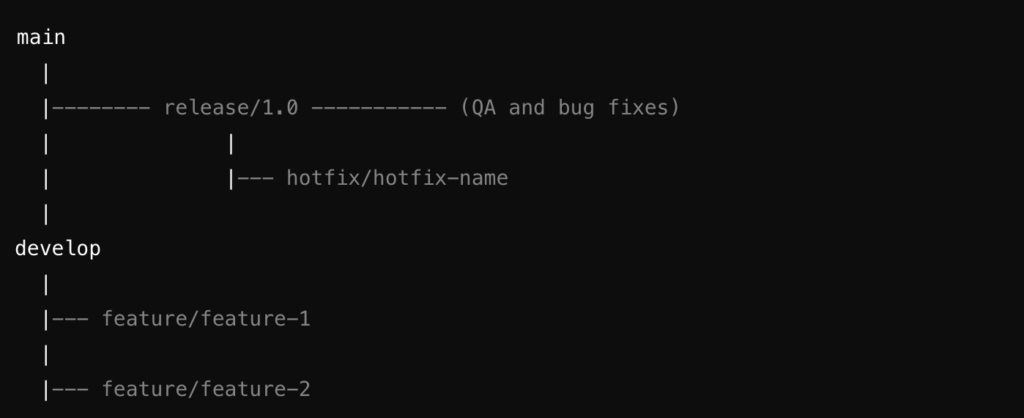
main: Stable, production-ready code.develop: Integration branch for all features.feature/feature-x: Individual branches for each feature.release/release-version: Preparation for release, includes QA and final bug fixes.hotfix/hotfix-name: For urgent fixes that need to be applied after a release.
- External Client Project Developed by One Team
- Project Characteristics:
- Client: Single external client.
- Teams: One development team.
- Release Strategy: Immediate releases after QA completion and critical bug resolution.
- Recommended Git Practices:
- Branching Strategy:
- Main Branch: The ‘
main‘ branch should be kept production-ready at all times, as releases are frequent and driven by immediate needs. - Feature Branches: Use ‘
feature/feature-name‘ branches for each new feature or bug fix. - Hotfix Branches: Given the nature of immediate releases, hotfix branches (‘
hotfix/hotfix-name‘) should be used for critical issues identified after a release.
- Main Branch: The ‘
- Merging Strategy:
- Merge completed feature branches directly into ‘
main‘ via PRs after thorough QA. The simplicity of the project structure allows for this direct approach. - Hotfix branches should be merged into ‘
main‘ immediately after the issue is resolved and tested.
- Merge completed feature branches directly into ‘
- Releasing Strategy:
- Releases are tagged directly on the
mainbranch as soon as they pass QA (v1.0.1,v1.0.2). - Consider using lightweight tags for interim builds or QA releases, and annotated tags for official client releases.
- Releases are tagged directly on the
- Branching Strategy:
- Project Characteristics:
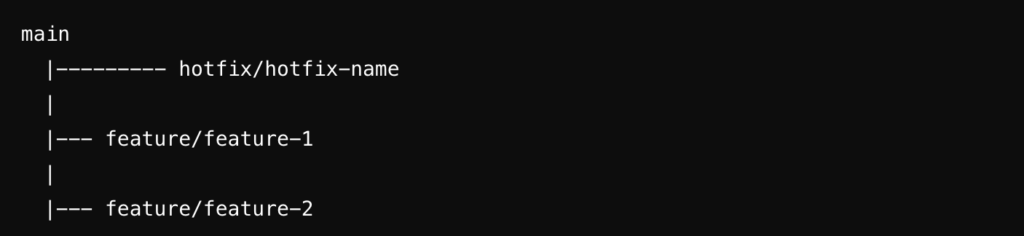
main: Production-ready, frequently updated branch.feature/feature-x: Feature development branches.hotfix/hotfix-name: Branches created to fix critical issues immediately after a release.
- Multi-Client Product with Different Versions
- Project Characteristics:
- Clients: Multiple clients on different versions of the product.
- Teams: Several teams working on various product areas.
- Release Strategy: Versioned releases tailored to individual clients.
- Recommended Git Practices:
- Branching Strategy:
- Main Branch: Use the ‘
main‘ branch as the latest stable version of the product. - Version Branches: Maintain long-lived branches for each major version (‘
release/1.x,release/2.x‘). These branches allow you to backport fixes or enhancements to clients on older versions. - Feature Branches: Each new feature or improvement should be developed in a feature branch (‘
feature/feature-name‘) from the target version branch.
- Main Branch: Use the ‘
- Merging Strategy:
- Features are merged into the respective version branch via PRs. If a feature is applicable to multiple versions, cherry-pick the commits across the relevant branches.
- Hotfixes should be merged into the version branch and, if necessary, forward-ported to newer versions.
- Releasing Strategy:
- Tag releases on the appropriate version branch (
v1.5.0,v2.3.0) before deploying to clients. - Use tags and branches to manage client-specific customizations, if necessary, by creating branches like ‘
client/client-name‘ from the relevant version branch.
- Tag releases on the appropriate version branch (
- Branching Strategy:
- Project Characteristics:
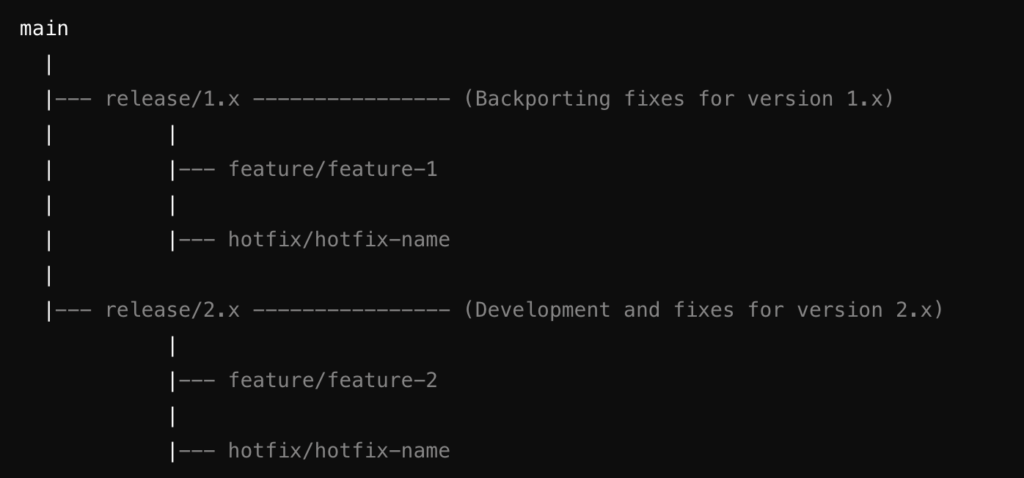
main: Latest stable version of the product.release/1.x,release/2.x: Long-lived branches for different versions of the product.feature/feature-x: Features developed for specific versions.hotfix/hotfix-name: Hotfixes applied to specific versions.
- SaaS Product with a Single Codebase for Multiple Clients
- Project Characteristics:
- Clients: Multiple clients using the same codebase.
- Teams: Multiple teams contributing to the product.
- Release Strategy: Continuous deployment with feature toggles or configurations for client-specific customizations.
- Recommended Git Practices:
- Branching Strategy:
- Main Branch: Use ‘
main‘ for the latest production-ready code. Given the continuous deployment model, themainbranch should always be stable and ready for release. - Feature Branches: Develop features in isolated ‘
feature/feature-name‘ branches, using feature toggles or flags to manage client-specific functionality. - Environment Branches: Optionally, use branches like ‘
staging‘ or ‘pre-production‘ for testing in environments that mimic production.
- Main Branch: Use ‘
- Merging Strategy:
- Merge feature branches into
mainafter testing and code review, ensuring all feature toggles or client configurations are correctly implemented. - Use environment branches for additional testing stages if your deployment pipeline requires it.
- Merge feature branches into
- Releasing Strategy:
- Deploy directly from the ‘
main‘ branch using automated CI/CD pipelines. - Tag major releases for easier rollback (
v3.0.0,v3.1.0), and use feature flags to manage rollout across different clients.
- Deploy directly from the ‘
- Branching Strategy:
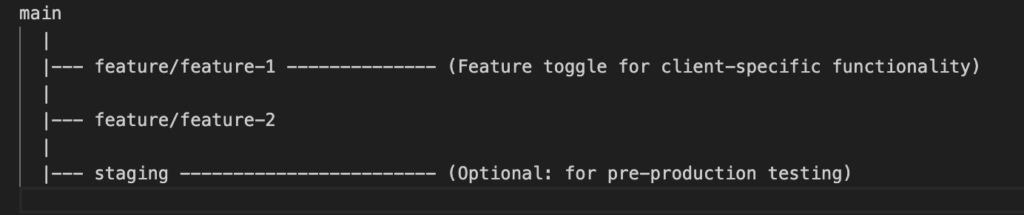
main: Single codebase ready for production deployment.feature/feature-x: Branches for feature development, often managed with feature toggles.staging: Optional branch for additional testing before production deployment.
General Git Best Practices
- Commit Often and Meaningfully: Make frequent, small commits with descriptive messages to improve traceability and collaboration.
- Use Pull Requests: Even for small teams, PRs encourage code reviews and discussion, leading to higher code quality.
- Rebase with Caution: While rebasing keeps a linear commit history, avoid it on public branches to prevent conflicts.
- Automate Testing: Integrate automated tests into your Git workflow to catch issues early and maintain code quality.
- Documentation: Maintain clear documentation on your branching and release strategy to ensure all team members follow the same practices.
Well I hope above gives teams trying set up a repository management strategy to match their project / product, some guidelines.