
Revamping Your Development Process: Elevating QA, UAT, and Production with Speed and Precision

In my experience working with or consulting engineering teams on supercharging their development, QA and release processes, I have seen that most places in trying to balance speed and quality has led to immense mental stress and sleepless nights to engineering teams. Not only that , in most cases you end up shipping half baked or crappy code to production.

You do need to ship features out the door quickly, but you also need to ensure that we follow a process that allows us to ship code safely. There should be very little “Oh shoot, this should have been caught on QA or UAT, not while the users are using and their customer is in front of them”. Here’s a deep dive into how you can sharpen your process while keeping the madness under control.

  • Branching Strategy: Keep It Clean, Keep It Smart

Let’s start with branching—a no-brainer, but often done wrong. If your DEV, QA, and UAT environments aren’t in sync, you’re playing with fire. Here’s the fix:

  1. DEV Branch: Think of it as the playground where things can break. Merge feature branches into DEV, but don’t push untested code past this point. DEV should be active but treated with caution.
  2. QA Branch: As soon as DEV has something worth testing, promote it to the QA branch. This branch is sacred ground for the QA team to test without distractions. Don’t cut corners by pushing to UAT or production before it’s stable.
  3. UAT Branch: The UAT branch is where your end users get involved. Ensure this branch is almost identical to production so that any last-minute issues can be caught and resolved before going live. If something goes wrong here, it’s the final warning before disaster.
    • Tools that can help:
      • Gitflow: A branching model that can make all this neat and manageable.
      • Feature Toggles (via LaunchDarkly or Unleash): Allows features to be toggled on/off without deploying new code, giving you more flexibility.

A good branching and merging strategy is imperative and is the first sanity check you need to have.

  • Fixing QA Issues in Real-Time and Keeping Everything in Sync

Now that we’ve got branching down, let’s tackle what happens when things go wrong in QA (because they will). Bugs found in QA should be fixed on the QA branch—don’t touch DEV yet. Once the fix is tested, backport it to DEV to ensure the same bug doesn’t creep back in later.

  • Fix in QATest in QAMerge to DEV. No shortcuts.

Skipping this will create chaos in UAT and production. You’ll end up with different bugs in each environment, making it impossible to keep track.

  • Speeding Up QA Without Cutting Corners

QA often feels like the bottleneck, right? The devs are done, and the product team is tapping their feet impatiently while QA painstakingly goes through tests. But we can supercharge QA without compromising thoroughness.

  1. Automate Smoke Tests: Tools like Selenium, Cypress, or Playwright can automate repetitive tests so that QA doesn’t have to spend time checking basic functionality every single time. Smoke tests should run immediately after every push to the QA branch, catching major issues early.
  2. Performance Testing Early: Use tools like JMeter or Gatling to test system performance during QA, not after. This helps identify bottlenecks before you’re staring down the barrel of a UAT disaster.
  3. Create and Maintain Robust Test Data: This is a big one. Testing with half-baked or outdated data isn’t going to cut it. Use data anonymization tools like Tonic.ai or Mockaroo to generate realistic datasets that mirror production.
  4. Shift-Left Testing: QA shouldn’t be an afterthought. Developers should write unit tests for their code (think Jest, Mocha, or JUnit), and the pipeline should include integration tests (with TestCafe or Pact for API testing) early in the process.
  • Shipping to UAT Without Losing Your Mind

You’ve got stable code from QA, and it’s time to ship it to UAT. This is where customers or users do their validation, but it has to be done methodically.

  1. Mirror Production: UAT should reflect production as closely as possible. Tools like Docker or Kubernetes can help create isolated environments that are clones of production, allowing your team to test under real-world conditions.
  2. Automated Deployments: Use tools like Jenkins, CircleCI, or GitLab CI/CD to automate deployments into UAT, making the process faster, repeatable, and less error-prone.
  3. Quick Feedback Cycles: Don’t leave customers hanging with long UAT cycles. Use tools like TestRail or Zephyr to manage test cases and feedback in UAT. Make sure there’s a clear process for logging bugs and responding quickly.
  • UAT Expediency: Customers Love Speed—Give It To Them

UAT often drags because end-users aren’t testing efficiently. The key here is to give them structure and ensure they’re not just clicking around randomly:

  1. Test Case Templates: Provide your customers with a checklist or clear test cases to follow. Use tools like Cucumber for behavior-driven development (BDD), where test scenarios are written in plain English, making it easy for non-technical users to understand what they should be testing.
  2. Run Sanity Checks in Parallel: Before customers even touch the UAT environment, run automated sanity checks to ensure the system is functioning correctly (similar to the smoke tests in QA).
  3. Feedback Mechanism: Use tools like Trello or JIRA to collect user feedback quickly and efficiently. Implement a tagging system that can help prioritize critical issues versus nice-to-haves, so the UAT process doesn’t drag on forever.

You can’t have your cake and eat it too—rushing things to production without proper QA and UAT will lead to headaches down the road. By creating a clear pipeline between DEV, QA, and UAT, and keeping those environments in sync, you’ll reduce the number of bugs creeping into production.

Key Tools Recap

  • Branching: Gitflow, LaunchDarkly (feature toggles)
  • Automation: Selenium, Cypress, JMeter, Jenkins, Docker
  • Data Preparation: Tonic.ai, Mockaroo
  • Test Management: TestRail, Zephyr
  • Feedback: Trello, JIRA

Focus on testing the right way with proper tools and processes, and you’ll see smoother releases, faster UAT cycles, and a lot less hair-pulling come production time.

Duties of a Software Architect – build for customer needs, not ours.

In my previous article (UNDERSTANDING THE ROLE OF A SOFTWARE ARCHITECT), I explained the role of a software architect as well how we can categorize software architects. Whilst writing that article what came to my mind is, do we really know what our duties or responsibilities are as an architect. So I decided write from my experience what are some key duties or responsibilities from us as architects.

One of the key challenges, which I have seen many times in projects and dealing with other architects  or even myself for a major part of my career (which is over 21 years  now), where most times we as architects try to come up with technological and architectural solutions but we miss the actual problem we are trying to solve. Sure, we know all the tools, the technologies, the diagrams, and the notations but for what we are using these tools of our trade is a sometime a question.  I believe as an architect the most important thing required by us is not a technical write up or an end state diagram or even a large solutions document, but simply to understand what’s the problem or the challenges our customers have. Given below are some projects from my experience where the teams almost missed the clients need by trying to build sophisticated solutions but by re-evaluating the actual customers need were able to come up with “Just good enough architecture” to help the clients to get what they need.

In a project one of our customers had an issue where their system which had grown organically over the years was at a state where it was not able to scale to handle the traffic volumes any more. The architecture teams were tasked at re-implementing the key areas of the systems that needed to scale. The team came up with a pretty cool target state, but that would be almost a complete rewrite of some major areas of the system and potentially would take a considerable time and effort. However rather than jumping in to building this cool new target state, the team decided to re evaluate what the actual need was, was it to build this super cool system that can scale at large in couple of years or was it to handle the traffic loads incrementally so that business see’s the system improve and scale with the demands. Once we identified the actual need of the customer was to have the system to have the ability to grow with the traffic growth gradually as well as have a buffer and resiliency to a sudden spike, we came up with a road map on how to get to our target state incrementally. Then by  developing some simple optimizations to the data base structure, queries, introducing parallel processing to some key areas that were impacted with traffic growth, and a bit of additional hardware to support the parallel processing,  we were able to handle almost 3x the traffic load. Whilst the business was enjoying the scale, the team worked in introducing caching to reduce the loads on the database, decentralizing the data base so that loads could be handled by slave data stores, and working on breaking the system’s key areas to service orientation with cloud native features and ability to add hardware on the fly (elasticity). This bought the system to be scaled at large and it also gave the business an immediate return on investment as their business grew exponentially.

In another system, which was logistic based, the team had architected a sophisticated solution where it was micro service based, and with rich front end UI’s using the latest front end scripting frameworks and web applications. A major part of the development effort was going for the web and mobile front to make sure that they were very attractive and user friendly. However when we again re-evaluated to look at the actual need of the client, and how the client would use the system operationally, we identified that the operational staff at the client end rarely needed to use a UI, what they really needed was a simple list with data to do their job and to get the list printed when needed. Once this was identified the need for sophisticated UI’s was no longer a need. This reduced a huge complexity from the system and cut down a major portion of development efforts. Another area identified was the system mainly needed trigger based jobs that needed to execute periodically and rather than developing the components as web applications or web services as originally planned, just doing simple CLI’s- the system complexity, cost of infrastructure and development efforts could be reduced drastically.

We had a request from one of the clients that they were having a challenge where they were getting data from various sources and the time taken to load that data to their main system, which needed to happen regularly, was extremely high. Their recommendation was to see if a data science approach can be taken to use machine learning to reduce the overall time taken. So the teams were engaged and architectures were planned. However a closer look at trying to understand what the actual challenge the customer had, we identified that the overall process from end to end had multiple manual workloads  that the areas that were looked at to be automated through machine learning, would not help the client that much. However after visualizing the current work flow, identifying what are the manual bottlenecks and how they can be automated through simple automation processes, were identified that we can ensure the overall time taken can be cut down drastically and all this can be done whilst the data science aspect (which obviously takes time for training and implementation) is getting implemented. Hence the customer starts seeing benefit almost immediately.

In another project for an online transaction processing product where for the team to deliver a simple product feature to production after development completion, it was taking at least two months. They were looking at implementing sophisticated tools and revamping / rewriting the system to be cloud native etc… This was a massive project which potentially could have taken years. However when we really drill down to the actual root cause of the problem, we were able to identify that the challenge mainly was in two main areas of the system where any change done in any area of the system impacts these two key areas. So rather than trying to revamp, rewrite the complete system from scratch and bringing in new sophisticated tools up front, we were able to come up with an end state architecture, where the system would become a micro serviced, cloud native, with proper devops pipelines, and that could release features to production within couple of minutes. However more important than that, we built a simple road map where within a short period of time the product teams had the ability to safely release features within two weeks after development by bringing in QA automation to key areas and devops tooling with team collaborations to the overall project. This gave a huge boost to the product teams to release features rapidly. Later we started working towards the end state where the releases can be done within couple of minutes.

These are some example out of many which I has to get involved in, which shows that rather than trying to find technical solutions, we need to be able to understand what is the problem that our customers have, why are they looking at us to come up with a solution, and then only look at how best we can help the customer with solving their problem. Let’s face it, if the customers do not have a problem, they certainly do not need to spend on an architect. I believe “Just good enough architecture” is an approach we would need to take rather than “grand scale architecture” when coming up with solutions.

Understanding the role of a Software Architect

According to Wikipedia the role of a Software Architect is defined as

Architects make high-level design choices based on their programming experience. An architect has thought through all the aspects of a software, just like an architect that builds a house. A construction architect knows where the ducts will be, where the electric connections will be and where the wall outlets will be. A design that a common person sees is just the walls and windows but a detailed design that is abstracted from the outsider are also present with the architect. In addition, the architect may sometimes propose technical standards, including coding standards, tools, or platforms.”

However according to my experience and according to actual software architects out there who have shared their experience; this is just a small portion of what goes into being a Software Architect.  A better analogy for me would be

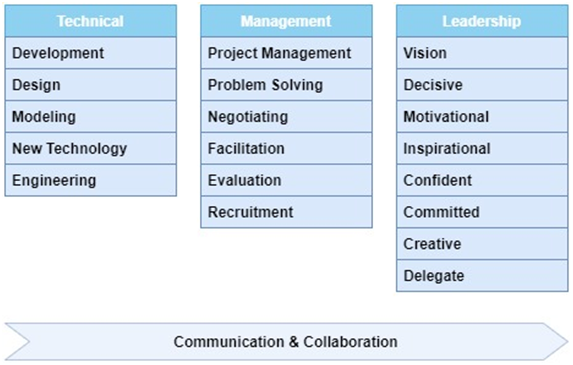
An architect is a person who works with a diverse set of people both technical and non technical to guide a project / product or an organization to it’s business success using technology , engineering, collaboration, leadership, project management, standards,  and governance.”

According to above an architect plays a role of technical visionary, leader as well as people and process champion to ensure a project is successfully completed.

Well, what does these actually mean?

However when we look at the content that is out there, we mostly see the technical aspects as designing, modeling, deep technology knowledge , engineering principles etc… but if we look at above list, we are looking at more non technical then technical aspects.

So what is an architect expected to do?

To understand this, let’s understand the typical types of software architects that we can find in the industry. Though there are many, I can see three clear distinct types or architects,

  • Enterprise Architect – A strategic architect who looks at the overall organization’s business processes, people, information flow, and business & technical strategies. The main goal is to align an organization’s IT with business goals. An enterprise architect looks at the long term initiatives.
  • Solutions Architect – A tactical architect who looks at cross domain and cross functional system interactions such as frameworks, infrastructure, road maps, guidance, cross cutting process & governance, reuse and strategic solutions. The main goal is to look at an organizations product or services suite and help to implement strategic solutions across the board.
  • Application Architect – An operational architect who is a subject matter expert and will focus on single application stack. Integration Architect, Cloud Architect, Data Architect, Mobile Architect etc… An Application Architect would focus on components, maintainability, modules, classes, libraries, languages etc…

Most of the content available mainly details application architects, which is about the operational implementation and remaining highly technical. But the different between a senior engineer and an architect are those non technical skills, which I would coin as the essential skills needed for an architect to be successful.  

So to be an effective software architect, we need to understand the role of an architect and the key role non technical essential skills play in the role.

So to answer the question “What is the role of a software architect” ? the best answer that I can put out is , a person who guides a project or product from inception to closure with a diverse set of teams by using leadership, management and broad set of technical skills.

In my next article I will dive deeper into understanding what are the technical and non-technical duties of a software architect.

Building an IT Strategy

Developing an IT strategy may look as a daunting task for many IT leaders and even a defined IT strategy may not yield the right outcome. Many reason could contribute to a failed IT strategy but some of the main reasons being

  • IT leaders being pushed for IT strategies where the business itself may not be having a right strategy with clear vision, mission, goals, and objectives
  • A strategy being based on several tactics that keeps changing frequently
  • A strategy based on some external consultant with a 200 page document that nobody really follows.

 IT strategy should be based on answering one key question,

how will IT helps business success

So it is imperative that what defines as business success is identified up front. There are many tools in identifying business success, but one simple but yet powerful tool could be using Value Discipline model by Michael Treacy and Fred Wiesemara. The Value Disciple allows an organization to understand what is the one thing that will create a competitive advantage over others and what is it that an organization wants to be famous for. Another great feature about the Value Discipline is that in can be applied at any stage of organizations growth

Strategy

Strategy should define a vision of how the company will succeed, what are the goals to succeed. Basically how will the company win, by focusing on what?

Strategy is long term, will not, and should not change frequently

Strategic plan

Are the short term tactics that will allow us to get to the long term strategy? These are short lived, 3 months – 1 year. Regularly evaluated and changed to meet the current need and environment change.

IT strategy can be broken into three key areas DEMAND , CONTROL , SUPPLY.

Demand encapsulate the business demand to ensure business success and the IT contribution to that success

Control defines how will the organization ensure the strategic design is enforced correctly

Supply is how will IT evolve it’s capabilities to meet the demand

Demand (How will we win)Control (How will we ensure strategic design)Supply (How will IT evolve it’s capabilities)
Business Context (Value Discipline)IT PrinciplesIT Service
Business SuccessIT GovernanceArchitecture
Business CapabilitiesFinance ManagementPeople
IT contributionMetricsSourcing

The IT strategy document should be an 10 – 15 page document that encapsulate what is needed for the organization from the above table. Not all is needed , but we should pick what we need for our business.

Some highlights from above are

Demand

Business Context (Value Discipline) – What discipline should be our core discipline that we will never compromise for any reason. This is what will make us win the game of business

What will be the measurement of business success?

Business Capabilities – What are our core capabilities we need to have in order ensure that we meet business success (Cycle Time,  M&A, Efficiency , Process Improvement, Agility and Change, Transparency, Innovation , etc….)

IT contribution – How will IT contribute for business to win?

Control

Principles – 8 or 10 core principles that will govern all IT decisions which should be catered towards how IT will help business win. Two key questions to ask each time we make a decision (strategy moment)

  1. How do we succeed as a business
  2. How will IT help

Governance – What will govern every IT decision in every area?

Metrics – what are the KPI’ s that IT leaders need to monitor in order to ensure that the IT strategy is being followed and IT is delivering it’s promise to support business sucess

Supply

IT Services – what are the IT services that needs to be improved, altered or added to ensure that IT supports the business.

Architecture – How should the application , infrastructure , product architecture improve or will enhance the capabilities of the business.

People – What and where are the skill gaps that needs to fulfilled in order for IT to supply business success

A well laid out IT strategy and strategic plan will ensure that IT delivers on it’s promise to ensure business success.

I hope that above gave some insight to IT leaders on building an IT strategy that will work and has worked for me.